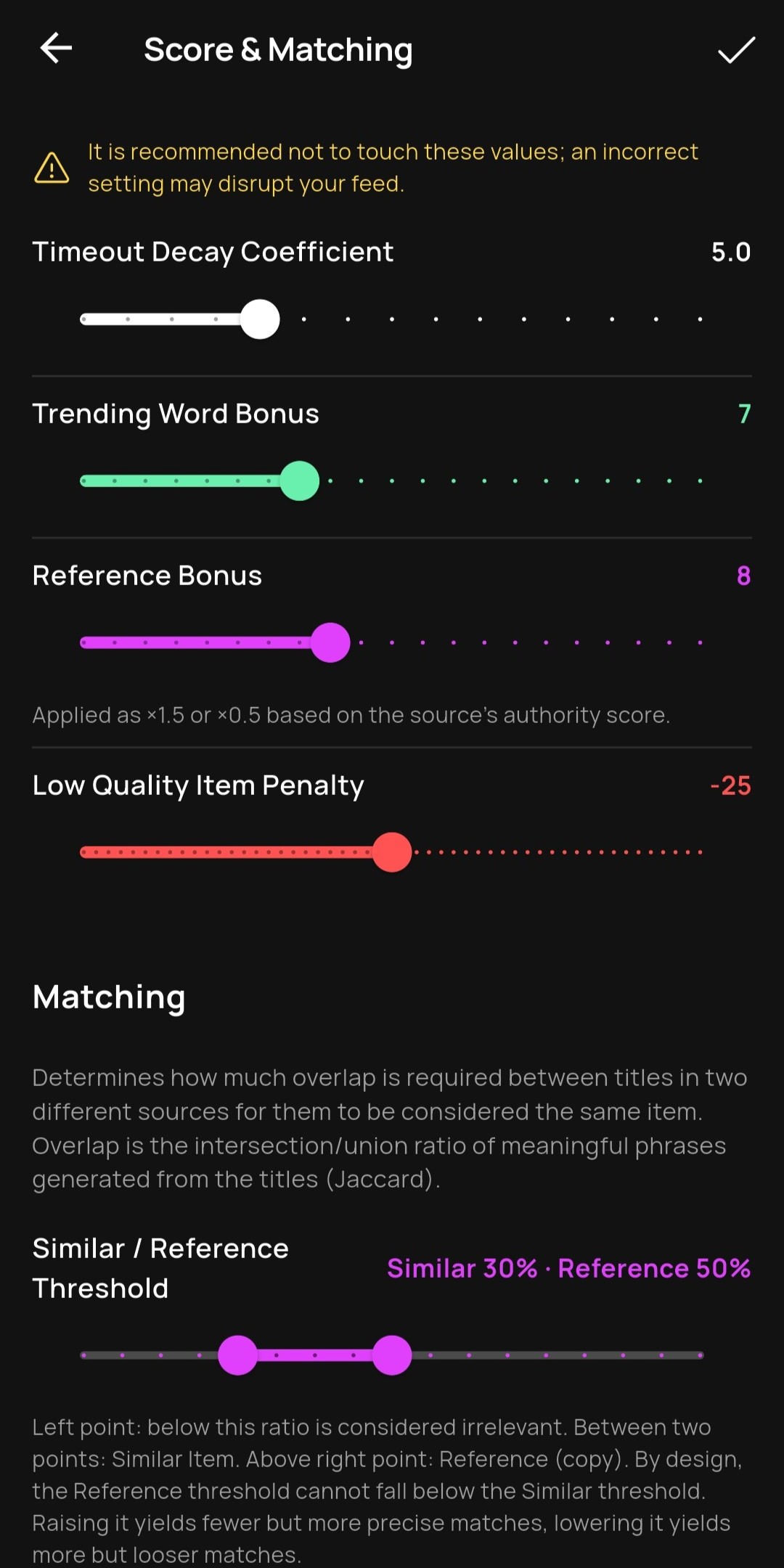
Thresholds Are in Your Hands — Your Own Gatekeeper
It is being able to set the limit values yourself that determine the difficulty level of the items that will enter the feed, that is, showing what proportion of doubt will be accepted.
MagPunk does not impose fixed rules on you. You can adjust the overlap and similarity thresholds, the decay speed, the low quality penalty, and the reference and trend contribution. If you raise the threshold, the system makes fewer mistakes but might miss some items (high precision, low recall); if you lower it, it catches more items but wrong predictions might mix in.
Example: Choosing to get notifications only for truly massive events by setting the notification score threshold very high.
Go deeper
Every analysis model produces statistical probabilities; the line determining where this probability will turn into a decision is called a threshold. For ML labels (low quality or critical), thresholds are selected automatically during training by using precision floors like 0.90 or 0.80, you cannot intervene in these. However, you can play with the thresholds open to user adjustment (overlap, etc.). There are logical limits in these settings; for example, the reference threshold cannot be lowered below the similarity threshold. Being able to manage thresholds is an extremely powerful feature that takes the control of the algorithm out of the developer’s hands and gives it directly into the user’s hands.